

Cookie Consent for Headless Websites
Cookiezy is a strong fit for headless teams that want API-first control, flexible rendering, and a consent model that can be shared across custom frontends. In this context, `headless` describes the project shape, while `plain-html` is the actual base adapter lane shipped inside Platform Core. Generated downloads should be paired with a registered production hostname so runtime verification can allow full mode.
Built for custom stacks where control, performance, and consistency matter.
Cookie banner preview
Lightweight. Fast. Clear by default.
Cookie consent. Done easy.
Lightweight consent that keeps your site fast and your data intact.
What the headless rollout actually uses
After account access is active you download `cookiezy-platform-core.zip`. For custom frontends the relevant files are the shared core assets in `packages/core/dist/` plus the `plain-html` adapter files in `packages/adapters/plain-html/`. The canonical entry file is `cookiezy-plain-adapter.js`; `headless-bootstrap.js` remains only as a deprecated compatibility wrapper.
- • `packages/adapters/plain-html/cookiezy-plain-adapter.js`
- • `packages/adapters/plain-html/example.html`
- • `packages/core/dist/cookie-consent.js`
- • `packages/core/dist/cookie-consent-ui.js`
- • `packages/core/dist/cookie-consent-scanner.js`
- • `packages/core/dist/cookie-consent.css`
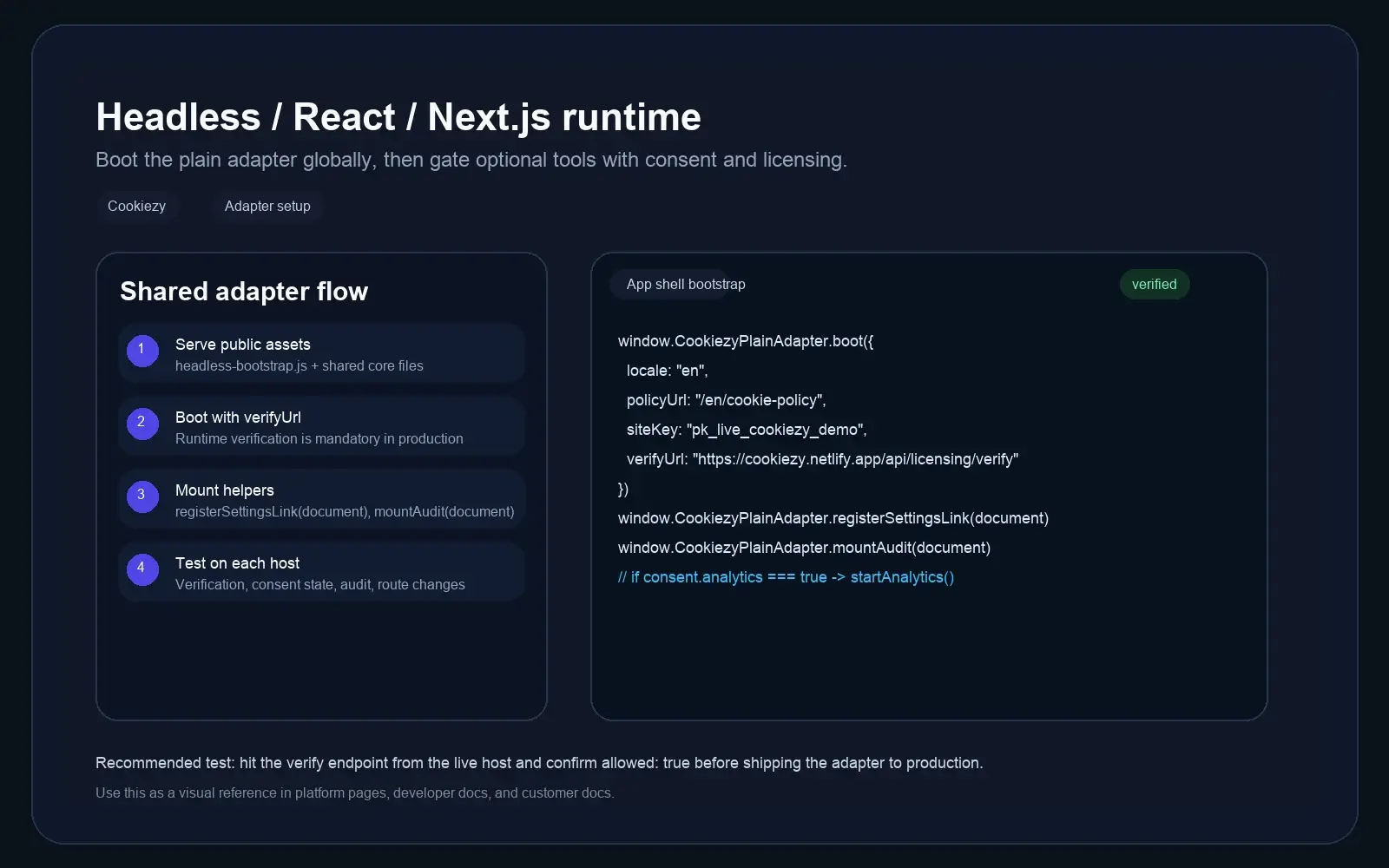
Place the canonical plain adapter and core assets in your app shell
Extract `cookiezy-platform-core.zip`, then copy `cookiezy-plain-adapter.js` and the shared core files from `packages/core/dist/` into a path your site actually serves, for example `/cookiezy/`. The example below assumes you copied the files there; Cookiezy does not currently provide a public CDN for these assets.
Code snippet
<link rel="stylesheet" href="/cookiezy/cookie-consent.css">
<script src="/cookiezy/cookiezy-plain-adapter.js"></script>
<script src="/cookiezy/cookie-consent.js"></script>Boot the plain adapter with your locale, policy URL, and issued license values
Use the same pattern shown in `packages/adapters/plain-html/example.html`. Boot the adapter before loading the UI and scanner scripts so the runtime knows your locale, storage key, policy route, and licensing context. Do not omit `license.siteKey` or `license.verifyUrl` in production, otherwise the runtime will immediately fall back to `license_not_configured` restricted mode.
Code snippet
<script>
  window.CookiezyPlainAdapter.boot({
    locale: "en",
    storageKey: "cookiezy_headless_v1",
    policyUrl: "/en/cookie-policy",
    theme: { layout: "bottom-right", themeClass: "" },
    license: {
      siteKey: "ck_live_replace_me",
      verifyUrl: "https://cookiezy.com/api/licensing/verify",
      billingUrl: "https://cookiezy.com/en/billing"
    },
    texts: {}
  });
</script>
<script src="/cookiezy/cookie-consent-ui.js"></script>
<script src="/cookiezy/cookie-consent-scanner.js"></script>Register the live hostname, settings link, and cookie audit
Before production launch, register every live hostname in Cookiezy billing so runtime verification can return `allowed: true`. After the scripts load, wire the helper methods from the plain adapter into your frontend. Use `registerSettingsLink(document)` for the footer link and `mountAudit(document)` on the policy page so visitors can inspect the live cookie scan.
Code snippet
<script>
  window.CookiezyPlainAdapter.registerSettingsLink(document);
  window.CookiezyPlainAdapter.mountAudit(document);
</script>Show the cookies your headless site is actually using
The headless adapter includes a policy-page audit mount that scans the current browser session and shows detected cookies with category, provider, purpose or description, and duration. Use the same `mountAudit(document)` helper on your cookie policy page so visitors and site owners can re-scan after consent changes.
Live cookie scan for this browser session
This audit reads the cookies currently visible on the domain in your browser and maps known cookies to categories and purposes. Re-scan after changing consent to verify what stays active.
How Cookiezy handles cookies on this site
Necessary cookies stay active so the site, login flow, and consent preferences keep working. Optional categories can be enabled or disabled by the visitor through Cookiezy settings.
This scan reflects the current browser session and the current state of consent on this device.
Cookie categories used on the site
Necessary
Required for security, routing, authentication, and storing the consent choice itself.
Analytics
Used to understand traffic and site usage when the visitor has granted analytics consent.
Marketing
Reserved for advertising, retargeting, and campaign tracking when marketing consent is granted.
Built for API-first consent workflows
A better fit for engineering-led teams that need flexibility rather than rigid plugin behavior.
Custom rendering control
Bring consent logic into your own frontend architecture and visual system.
Shared consent logic
Use one consent model across several frontend experiences and locales.
Policy page audit
The plain adapter includes helper methods for the settings link and audit mount flow.
Headless-ready rollout
A stronger foundation for teams that do not want framework lock-in or want issued packages with runtime verification.
Headless consent FAQ
Answers for teams building custom websites and composable frontends.
Which ZIP should I use for a custom frontend?
Use `cookiezy-platform-core.zip` and combine the shared core files from `packages/core/dist/` with the plain adapter files in `packages/adapters/plain-html/`.
What is the difference between headless and plain-html here?
Headless describes the custom frontend project shape. `plain-html` is the actual base adapter lane used to boot Cookiezy in that environment. The canonical entry file is `cookiezy-plain-adapter.js`, and the intended runtime pattern is shown in `packages/adapters/plain-html/example.html`.
How do I connect the footer settings link?
Use `window.CookiezyPlainAdapter.registerSettingsLink(document)` after the scripts load.
How do I show the cookie audit on the policy page?
Call `window.CookiezyPlainAdapter.mountAudit(document)` on the policy page after the scanner script is loaded.
What happens if the live hostname is not registered or billing is inactive?
The runtime should fall back to necessary-only restricted mode. In practice, optional analytics, marketing, and premium runtime behavior stay blocked until the hostname is registered and the account returns to good standing.