

Documentation last updated May 29, 2026
Headless adapter release status
Current headless runtime version and rollout notes for the plain adapter shipped inside Platform Core.
Current version
0.1.23
Delivery lane
Included in Platform Core
Compatibility notes
Headless rollouts still rely on the plain adapter shipped inside Platform Core.
Key rollout changes
1. Load `cookiezy-plain-adapter.js` with the shared runtime assets.
2. Register every live hostname before publish.
3. Keep locale routes and policy URLs aligned with the frontend router.
Headless adapter: post-purchase rollout
Use this guide for any custom frontend that relies on the plain adapter runtime from the ZIP package.
- • Download `platform-cookie-core.zip` from the customer area.
- • Copy the plain adapter and shared core assets into your global shell or CDN.
- • Register every live hostname in billing.
- • Boot the runtime with `license.siteKey`, `license.verifyUrl`, and `license.billingUrl` before UI and scanner load.
- • Validate `allowed: true`, consent state gating, policy page audit behavior, and the necessary-only fallback when licensing is not active.
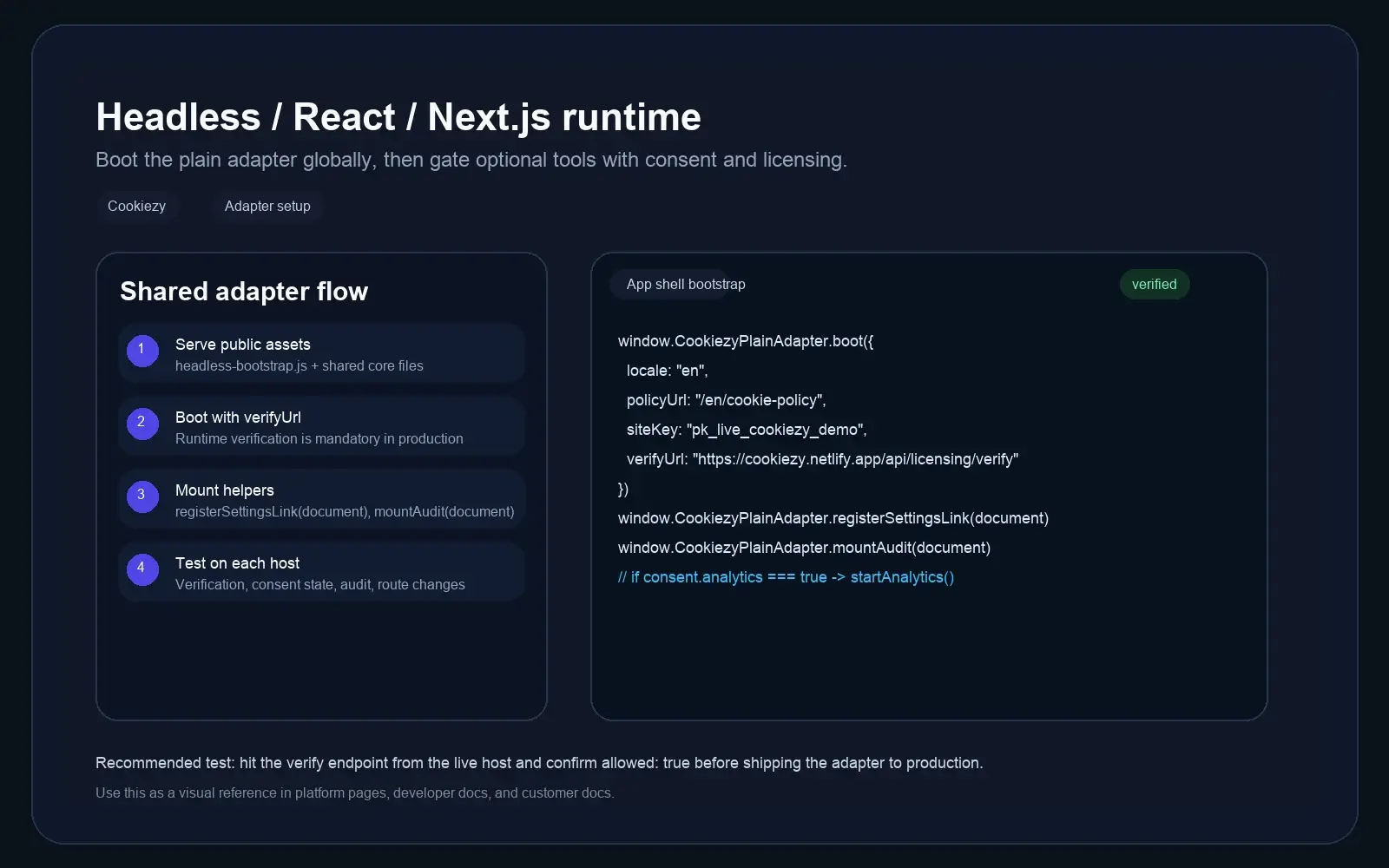
Load the runtime from the app shell
Serve the shared CSS, core runtime, UI, scanner, and the canonical `cookiezy-plain-adapter.js` entry file from a path available to every route.
Code snippet
<link rel="stylesheet" href="/cookie-consent.css" />
<script src="/cookiezy-plain-adapter.js"></script>
<script src="/cookie-consent.js"></script>
<script src="/cookie-consent-ui.js"></script>
<script src="/cookie-consent-scanner.js"></script>Boot with licensing verification enabled
Runtime verification is mandatory for production so the adapter cannot be copied to unlimited domains without an active licensed hostname.
Code snippet
window.CookiezyPlainAdapter.boot({
  defaultLocale: "en",
  localeRoutes: {
    en: { policyUrl: "/en/cookie-policy", pathPrefixes: ["/en"] },
    sl: { policyUrl: "/sl/politika-piskotkov", pathPrefixes: ["/sl"] },
    de: { policyUrl: "/de/cookie-policy", pathPrefixes: ["/de"] }
  },
  storageKey: "cookiezy_headless_v1",
  license: {
    siteKey: "ck_live_cookiezy_demo",
    verifyUrl: "https://cookiezy.com/api/licensing/verify",
    billingUrl: "https://cookiezy.com/en/billing"
  }
});Use locale routes when the site has localized URLs
The shared core now supports `defaultLocale` plus `localeRoutes`. On plain headless sites, this is the recommended way to keep banner language and the cookie policy link aligned with `/en`, `/sl`, or other locale folders.
- • If you already know the locale from your router, you can still pass `locale` directly.
- • If you use folder-based routes, set `pathPrefixes` so Cookiezy can infer the active locale from the current URL.
- • Each locale route should point to the matching cookie policy page.
Wire helpers and run production tests
Use the helper methods on every production frontend so visitors can reopen settings and inspect the policy page audit.
Code snippet
window.CookiezyPlainAdapter.registerSettingsLink(document);
window.CookiezyPlainAdapter.mountAudit(document);Headless test checklist
Do these checks before launch on each hostname.
- • Verification endpoint returns `allowed: true` for the registered hostname.
- • First visit shows the banner.
- • Optional analytics stays gated until consent.
- • Settings link reopens the modal.
- • Policy page audit mounts and re-scan reflects the current state.
- • If licensing is missing or inactive, the runtime falls back to necessary-only restricted mode and shows a billing recovery path.