

Documentation last updated May 27, 2026
Cookie Consent for Shopify
Cookiezy gives Shopify teams a cleaner way to handle consent using the actual theme app extension package. The storefront entrypoint is `cookie-consent-shopify-loader.js`, which loads the shared consent runtime, UI, scanner, and optional Shopify customer privacy bridge. For larger rollouts, the packaged flow can also be paired with the Cookiezy embedded Shopify admin scaffold for merchant onboarding, billing, and support operations.
A practical Shopify consent layer for merchants, ecommerce teams, and agencies.
Cookie banner preview
Lightweight. Fast. Clear by default.
Cookie consent. Done easy.
Lightweight consent that keeps your site fast and your data intact.
What the Shopify ZIP includes
After account access is active you download `cookiezy-platform-core.zip`. For Shopify you use the theme app extension bundle inside `packages/adapters/shopify/theme-app-extension/`. The extension is the storefront runtime layer; the optional embedded app scaffold is a separate admin and billing surface for more advanced productized rollouts.
- • `assets/cookie-consent-shopify-loader.js`
- • `assets/cookie-consent.js`
- • `assets/cookie-consent-ui.js`
- • `assets/cookie-consent-scanner.js`
- • `assets/cookie-consent.css`
- • `assets/shopify-customer-privacy-bridge.js`
- • `blocks/cookiezy-embed.liquid`
- • `shopify.extension.toml`
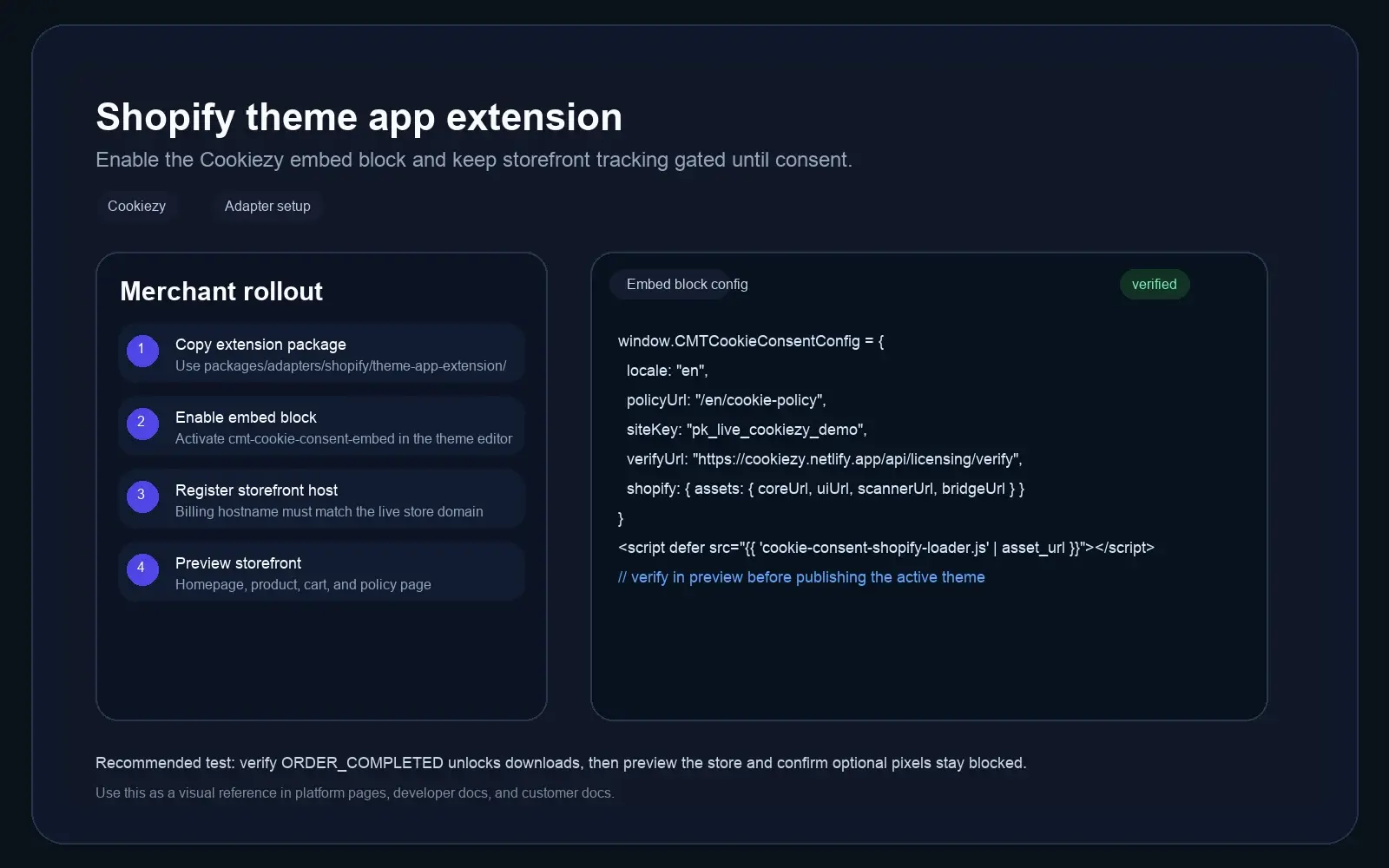
What the Shopify storefront package proves in practice
The Shopify lane is grounded in the actual extension files and Theme Editor fields, not a generic script-paste recipe.
- • The storefront uses `cookie-consent-shopify-loader.js` as the single entrypoint for the shared runtime assets.
- • The loader sequence is explicit: core runtime, UI, scanner, then the optional Shopify customer privacy bridge.
- • The `cookiezy-embed` block exposes merchant-facing fields for policy URL, site key, verification URL, billing URL, banner layout, and theme CSS class.
- • The same package can later be paired with the embedded Shopify admin scaffold for onboarding, billing, and support operations.
Upload the theme app extension files to your Shopify app or store package
Extract `cookiezy-platform-core.zip` and copy the full Shopify extension contents from `packages/adapters/shopify/theme-app-extension/` into your Shopify app or extension workspace. Keep the asset names unchanged because the embed block references them directly.
- • Keep `cookie-consent-shopify-loader.js` as the main storefront entrypoint
- • Include `shopify-customer-privacy-bridge.js` if you want Shopify privacy events aligned with Cookiezy
- • Do not rename the Liquid block or asset files
Enable the Cookiezy embed block in the theme editor
Deploy the theme app extension, then enable `cookiezy-embed` in the Shopify theme customizer. The block injects the stylesheet, `window.CookiezyConfig`, the account-linked licensing fields, and the `cookie-consent-shopify-loader.js` entrypoint.
Code snippet
{{ 'cookie-consent.css' | asset_url | stylesheet_tag }}
<script>
  window.CookiezyConfig = {
    locale: "en",
    policyUrl: "/en/cookie-policy",
    shopify: {
      assets: {
        coreUrl: "{{ 'cookie-consent.js' | asset_url }}",
        uiUrl: "{{ 'cookie-consent-ui.js' | asset_url }}",
        scannerUrl: "{{ 'cookie-consent-scanner.js' | asset_url }}",
        bridgeUrl: "{{ 'shopify-customer-privacy-bridge.js' | asset_url }}"
      }
    }
  };
</script>
<script defer src="{{ 'cookie-consent-shopify-loader.js' | asset_url }}"></script>Use a development store before you touch the live theme
The cleanest first rollout path is a Shopify development store plus an extension-only app. That lets you validate the theme app extension, Theme Editor fields, and storefront behavior before you publish live theme changes.
- • Create a Shopify development store in Partner Dashboard.
- • Create an extension-only app for the first storefront smoke test.
- • Generate a theme app extension and copy the Cookiezy Shopify files into that extension workspace.
- • In Theme Editor confirm the block exposes Cookie policy URL, Cookiezy Site Key, License verification URL, Billing / portal URL, Banner layout, and Theme CSS class.
Register the production domain and validate consent behavior
Register the live storefront hostname in Cookiezy billing before publish so runtime verification can return `allowed: true`. Then use the Shopify theme preview to test the banner on homepage, collection, product, and cart pages. Confirm optional tracking stays blocked until consent and that your policy page shows the audit correctly.
- • Check homepage, product page, and cart in a clean session
- • Register the exact storefront hostname you are testing, whether it is `myshopify.com` or a custom domain
- • Verify the banner loads from the embed block without editing `theme.liquid` manually
- • Confirm analytics and marketing tools wait for consent
- • Open `/en/cookie-policy` and re-scan cookies after each consent change
A practical Shopify pilot example
The cleanest first rollout is still a development store plus an extension-only app, because it lets you validate the full storefront consent layer before touching the live theme.
Code snippet
1. Create a Shopify development store and an extension-only app.
2. Copy `packages/adapters/shopify/theme-app-extension/` into the generated extension workspace.
3. Enable the `cookiezy-embed` block in Theme Editor.
4. Fill in the policy URL, site key, verification URL, billing URL, and chosen layout.
5. Test homepage, product, and cart in a clean session before publishing to the live theme.
What to test before a Shopify store goes live
These checks are the difference between a storefront demo and a safe production rollout.
- • The banner loads from the embed block without editing `theme.liquid` directly.
- • The tested hostname matches the registered storefront hostname, whether that is `myshopify.com` or a custom domain.
- • Optional analytics and marketing stay blocked until the visitor opts in.
- • The Shopify customer privacy bridge only loads when that sync is enabled.
- • The cookie policy page shows the audit block and still updates after a re-scan.
Show the cookies active on your Shopify storefront
Cookiezy can add a policy-page audit that scans the live storefront session and lists detected cookies with category, provider, purpose or description, and duration. This gives merchants and visitors a clearer view of what remains active after analytics or marketing consent changes.
Live cookie scan for this browser session
This audit reads the cookies currently visible on the domain in your browser and maps known cookies to categories and purposes. Re-scan after changing consent to verify what stays active.
How Cookiezy handles cookies on this site
Necessary cookies stay active so the site, login flow, and consent preferences keep working. Optional categories can be enabled or disabled by the visitor through Cookiezy settings.
This scan reflects the current browser session and the current state of consent on this device.
Cookie categories used on the site
Necessary
Required for security, routing, authentication, and storing the consent choice itself.
Analytics
Used to understand traffic and site usage when the visitor has granted analytics consent.
Marketing
Reserved for advertising, retargeting, and campaign tracking when marketing consent is granted.
Consent features that fit ecommerce workflows
Designed for Shopify stores that care about UX, compliance, and storefront speed.
Theme app extension ready
The package ships with a real Shopify embed block instead of a generic copy-paste script.
Storefront-safe UI
A cleaner banner experience that fits into modern ecommerce layouts.
Consent-aware marketing
Reduce the risk of optional marketing and analytics tools firing too early.
Shopify privacy bridge
Use the included bridge asset when you want Cookiezy and Shopify privacy signaling to stay aligned.
Admin rollout path
Pair the storefront extension with the optional embedded Shopify admin when you want merchant onboarding, billing, and support states handled inside the app.
Shopify cookie consent FAQ
Common questions from Shopify teams evaluating a consent platform.
Which file actually loads Cookiezy on the storefront?
The storefront entrypoint is `cookie-consent-shopify-loader.js`. It loads the shared runtime, UI, scanner, and optional Shopify bridge assets.
Do I need to edit theme.liquid directly?
Not for the packaged adapter flow. The intended path is to deploy the theme app extension and enable the `cookiezy-embed` block in the theme editor.
What is the Shopify customer privacy bridge for?
The `shopify-customer-privacy-bridge.js` asset helps align Cookiezy with Shopify's customer privacy layer when you want those events to stay in sync.
Can shoppers reopen their consent settings?
Yes. Cookiezy supports a persistent settings re-open path so visitors can change their preferences later.
What happens if billing is inactive or the shop domain is not allowed?
The storefront runtime should fall back to necessary-only restricted mode. Optional analytics, marketing, and premium behavior stay blocked until the shop is in good standing and the runtime verification check returns `allowed: true`.
Why would restricted mode still appear on Shopify?
The most common causes are missing `siteKey`, `verifyUrl`, or `billingUrl` values in `window.CookiezyConfig`, or a mismatch between the registered Cookiezy hostname and the storefront hostname you are actually testing.