

Documentation last updated May 27, 2026
Shopify adapter release status
Current Shopify storefront lane version and rollout notes for the extension shipped inside Platform Core.
Current version
0.1.23
Delivery lane
Included in Platform Core
Compatibility notes
Shopify storefront rollout still ships through Platform Core while the standalone app lane remains separate.
Key rollout changes
1. Use the theme app extension from Platform Core.
2. Treat the embedded app lane as separate admin surface, not the primary storefront installer.
3. Validate the embed block in a development store before live rollout.
Shopify adapter: post-purchase rollout
Use this guide after payment to move from generated ZIP to storefront verification. The Shopify runtime layer lives in the theme app extension. The optional embedded app is a separate admin and billing lane for larger productized rollouts.
- • Download `cookiezy-platform-core.zip` from `/en/downloads`.
- • For Shopify use `packages/adapters/shopify/theme-app-extension/` from that package.
- • Start with a Shopify development store and extension-only app before touching the live theme.
- • Register the exact storefront hostname in billing before enabling the Cookiezy embed block.
- • Validate homepage, product, collection, cart, and policy page behavior in a clean session.
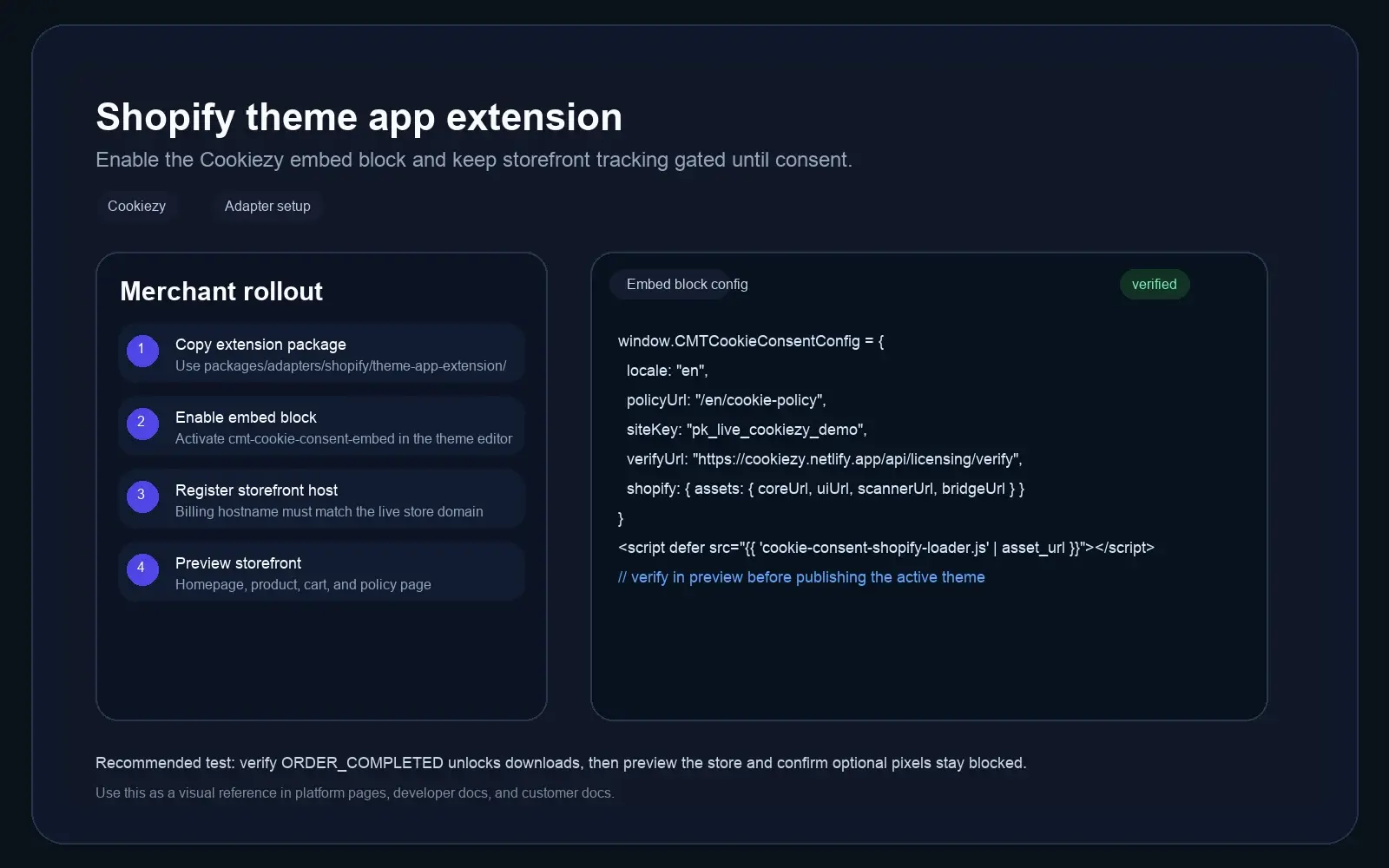
Download Platform Core and keep the Shopify files intact
Shopify is currently delivered inside Platform Core rather than as a standalone ZIP. Keep the file names intact because the Liquid block and loader reference them directly.
Code snippet
packages/adapters/shopify/theme-app-extension/assets/cookie-consent-shopify-loader.js
packages/adapters/shopify/theme-app-extension/assets/cookie-consent.js
packages/adapters/shopify/theme-app-extension/assets/cookie-consent-ui.js
packages/adapters/shopify/theme-app-extension/assets/cookie-consent-scanner.js
packages/adapters/shopify/theme-app-extension/assets/cookie-consent.css
packages/adapters/shopify/theme-app-extension/assets/shopify-customer-privacy-bridge.js
packages/adapters/shopify/theme-app-extension/blocks/cookiezy-embed.liquid
packages/adapters/shopify/theme-app-extension/locales/en.default.json
packages/adapters/shopify/theme-app-extension/locales/en.default.schema.jsonUse a development store and extension-only app for the first smoke test
The lowest-friction first test is a Shopify development store plus an extension-only app. Generate a theme app extension, copy the Cookiezy Shopify files into that extension workspace, then preview from there.
- • Create a Shopify development store in Partner Dashboard.
- • Create an extension-only app for the first storefront smoke test.
- • Generate a theme app extension and copy the full `theme-app-extension/` directory contents into it.
- • Remove demo scaffold leftovers before testing so only the Cookiezy block remains.
Expose the Theme Editor settings that merchants actually need
The embed block should expose the production values directly in Theme Editor so merchants or delivery teams can finish setup without editing Liquid by hand.
- • Cookie policy URL
- • Cookiezy Site Key
- • License verification URL
- • Billing / portal URL
- • Banner layout
- • Theme CSS class
Register the exact storefront hostname before you publish
Cookiezy licensing checks the exact storefront hostname at runtime. Register the host that the storefront actually uses, not just the one that feels equivalent in Shopify admin.
- • `my-shop.myshopify.com` and a custom storefront domain are different hostnames.
- • If you test on the custom domain, register the custom domain.
- • If you test on the `myshopify.com` host, register that exact hostname.
- • After setup, confirm `/api/licensing/verify` returns `allowed: true` for the storefront hostname.
Deploy the extension and validate storefront behavior
Deploy the theme app extension, enable `cookiezy-embed` in the active theme, then test in theme preview or a clean session before publishing live theme changes.
- • Confirm Theme Editor shows all expected settings before save.
- • Homepage shows the banner on first visit.
- • Product, collection, and cart pages do not leak optional tracking before consent.
- • Reject optional blocks analytics and marketing categories.
- • The policy page audit renders and reflects the current state after re-scan.
Quick checks when Shopify consent does not behave as expected
Most Shopify rollout issues come from config visibility, exact hostname mismatches, or stale assets rather than from the core consent runtime itself.
- • If `verify_url` or `billing_url` do not appear in Theme Editor, check the extension schema and locale files.
- • If the storefront falls into restricted mode, inspect `window.CookiezyConfig` and confirm `siteKey`, `verifyUrl`, and `billingUrl` are populated.
- • If licensing still fails, verify that the exact storefront hostname is registered in Cookiezy billing.
- • If you updated the package, make sure the theme app extension assets were redeployed and the active theme uses the new embed build.