

Documentation last updated May 29, 2026
Webflow adapter release status
Current Webflow lane version and rollout notes for the adapter that still ships inside Platform Core.
Current version
0.1.23
Delivery lane
Included in Platform Core
Compatibility notes
Webflow still ships inside Platform Core and remains a hosted-assets rollout rather than a standalone ZIP.
Key rollout changes
1. The canonical entry file is `cookiezy-webflow-adapter.js`.
2. Publish only after the live Webflow hostname is registered.
3. Validate banner, settings reopen, and policy-page audit on the published site.
Webflow adapter: purchase to production
Use this guide after payment to move from `platform-cookie-core.zip` to a validated Webflow production rollout.
- • Download `platform-cookie-core.zip` from the customer downloads area.
- • Register the production Webflow hostname in billing before publish.
- • Host `packages/adapters/webflow/assets/` and `packages/core/dist/` on a public asset domain.
- • Paste the head and footer snippets into Webflow custom code settings.
- • Publish, then test banner, settings reopen, licensing response, and policy page audit.
Prepare the ZIP contents
Extract the package and keep the file names unchanged. The Webflow snippets assume the exact asset names from the package. The canonical head entry file is `cookiezy-webflow-adapter.js`.
Code snippet
packages/adapters/webflow/assets/cookiezy-webflow-adapter.js
packages/adapters/webflow/assets/webflow-loader.js
packages/core/dist/cookie-consent.js
packages/core/dist/cookie-consent-ui.js
packages/core/dist/cookie-consent-scanner.js
packages/core/dist/cookie-consent.css
packages/adapters/webflow/embeds/global-head-snippet.html
packages/adapters/webflow/embeds/global-footer-snippet.html
packages/adapters/webflow/embeds/policy-page-embed.htmlHost the adapter files
Upload the Webflow assets and the shared core files to a public asset path you control. Cookiezy does not currently provide a public CDN for these files. Replace `__COOKIEZY_ASSET_BASE_URL__` in the snippets with your final public asset root.
- • Keep one consistent asset root for Webflow.
- • Do not rename `cookiezy-webflow-adapter.js` or `webflow-loader.js`.
- • Use HTTPS URLs only.
Code snippet
__COOKIEZY_ASSET_BASE_URL__/webflow/cookiezy-webflow-adapter.js
__COOKIEZY_ASSET_BASE_URL__/webflow/webflow-loader.js
__COOKIEZY_ASSET_BASE_URL__/webflow/cookie-consent.js
__COOKIEZY_ASSET_BASE_URL__/webflow/cookie-consent-ui.js
__COOKIEZY_ASSET_BASE_URL__/webflow/cookie-consent-scanner.js
__COOKIEZY_ASSET_BASE_URL__/webflow/cookie-consent.cssRegister the live hostname in billing
Before you publish, add the production Webflow hostname in Cookiezy billing. The runtime verification endpoint must return `allowed: true` for the site to operate in normal mode.
Code snippet
POST /api/licensing/verify
{
  "siteKey": "<your site key>",
  "hostname": "www.example.com",
  "adapter": "webflow"
}Paste the Webflow custom code snippets
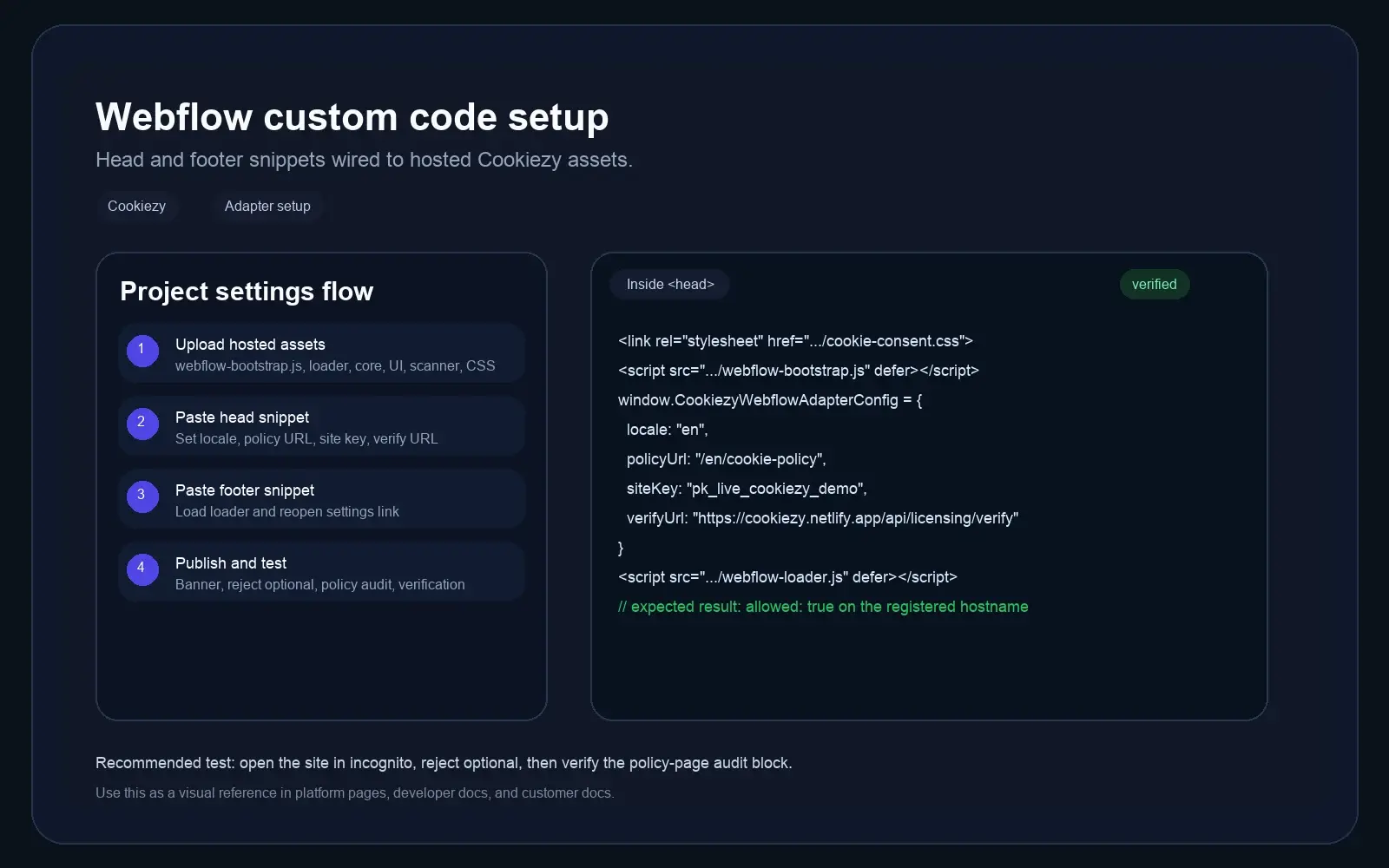
Put `global-head-snippet.html` into `Inside <head>` and `global-footer-snippet.html` into `Before </body>` in Webflow project settings. Replace `__COOKIEZY_ASSET_BASE_URL__`, policy route, and licensing values from the issued package.
Code snippet
<link rel="stylesheet" href="__COOKIEZY_ASSET_BASE_URL__/webflow/cookie-consent.css">
<script src="__COOKIEZY_ASSET_BASE_URL__/webflow/cookiezy-webflow-adapter.js" defer></script>
<script>
  window.CookiezyWebflowAdapterConfig = {
    defaultLocale: "en",
    localeRoutes: {
      en: { policyUrl: "/en/cookie-policy", pathPrefixes: ["/en"] },
      sl: { policyUrl: "/sl/politika-piskotkov", pathPrefixes: ["/sl"] }
    },
    storageKey: "webflow_cookie_consent_v1",
    license: {
      siteKey: "ck_live_cookiezy_demo",
      verifyUrl: "https://cookiezy.com/api/licensing/verify",
      billingUrl: "https://cookiezy.com/en/billing",
      adapter: "webflow",
      version: "1.0.0"
    },
    webflow: {
      assets: {
        coreUrl: "__COOKIEZY_ASSET_BASE_URL__/webflow/cookie-consent.js",
        uiUrl: "__COOKIEZY_ASSET_BASE_URL__/webflow/cookie-consent-ui.js",
        scannerUrl: "__COOKIEZY_ASSET_BASE_URL__/webflow/cookie-consent-scanner.js"
      }
    }
  };
</script>
<script src="__COOKIEZY_ASSET_BASE_URL__/webflow/webflow-loader.js" defer></script>Use locale routes for Webflow Localization
When Webflow serves localized paths like `/en` and `/sl`, define them in `localeRoutes`. The shared core will derive the active locale from the current path and use the correct cookie policy URL for that locale.
- • If the site uses one language only, a single `policyUrl` is still enough.
- • If the site uses localized folders, define `pathPrefixes` for each locale.
- • Keep the Webflow localization path structure and Cookiezy policy routes aligned.
Add the policy audit block and test
Insert `policy-page-embed.html` into a Webflow Embed component on the cookie policy page, publish the site, then test a fresh session end-to-end.
- • First visit shows the banner.
- • Reject optional keeps optional tools blocked.
- • Accept all updates the consent state.
- • Footer settings link reopens the modal.
- • Policy page audit renders and re-scan works.
- • Verification endpoint returns `allowed: true` on the live hostname.
- • If billing is inactive or the hostname is missing, the runtime falls back to necessary-only restricted mode.